
Run Ecommerce Ads Like a Pro In 2025
Ecommerce ads are paid digital campaigns that promote online products across search engines, shopping feeds, and social platforms to drive traffic, clicks, and direct purchases. They combine product feeds, targeted audiences, creative assets, and conversion tracking to convert browsers into buyers and scale online revenue.
Introduction
If you want to run ecommerce ads like a pro in 2025, you need a strategy that blends creative testing, granular audience segmentation, and tight conversion tracking. I’ve run campaigns for retailers that scaled from zero to six figures, and here is the exact playbook I use. It’s practical, tactical, and focused on measurable ROI.
Why ecommerce ads still work and what changed
Ecommerce ads remain the fastest path to predictable revenue. Organic channels build trust over time, and yeah paid ads put products in front of buyers who are ready to purchase. But here’s the thing: privacy shifts, AI-driven bidding, and creative-first platforms mean campaigns must be built differently today.
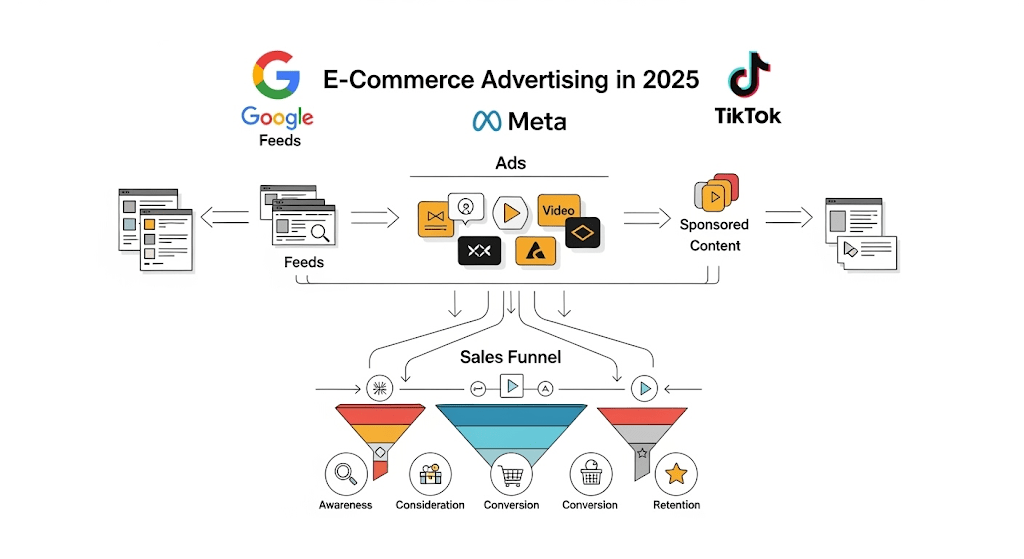
Core components of a pro ecommerce ads program
Product feed optimization
Campaign structure and naming conventions
Creative testing library
Audience segmentation and retargeting
Conversion rate optimization and landing page alignment
ROAS-focused bidding and budget pacing
Analytics, attribution, and experiment design
“If you’re still figuring out how SEO and paid ads complement each other, check out our SEO services
1. Research and intent mapping
Start with research that maps keywords and buyer intent. Identify:
High-intent keywords for search ads where users intend to buy.
Comparison queries that require product pages.
Awareness queries ideal for social prospecting and discovery.
Practical tip: export Search Console and Ads queries, then group by purchase intent. Build a keyword sheet that will inform product-level campaigns and content used to support ecommerce ads.
2. Product feed that converts
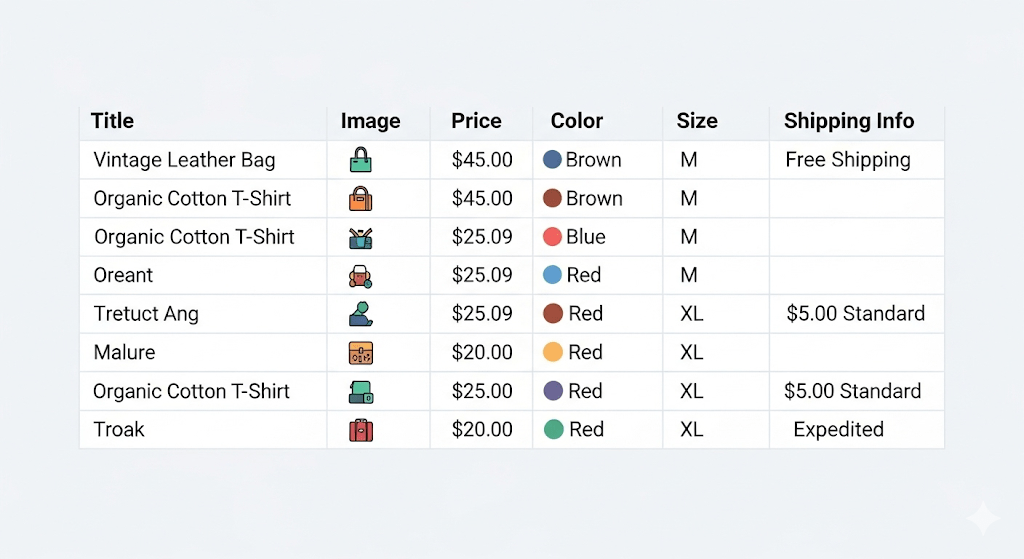
A clean product feed is the foundation of any successful ecommerce ads effort. Include:
High-quality images and fallback images
Unique product titles with brand and model
Structured attributes: size, color, material
Category mappings that reflect merchant taxonomy
Merchant promotions and shipping info
Checklist for product feed optimization
Unique product titles with brand and model
Structured attributes: size, color, material
High-resolution images and fallback images
Category mappings and merchant promotions
Example: A fashion client increased conversion by 28% after adding size and material attributes and testing five product images per SKU. That improved the quality of product listings used in ecommerce ads and reduced CPC waste.
Platform selection and when to use each
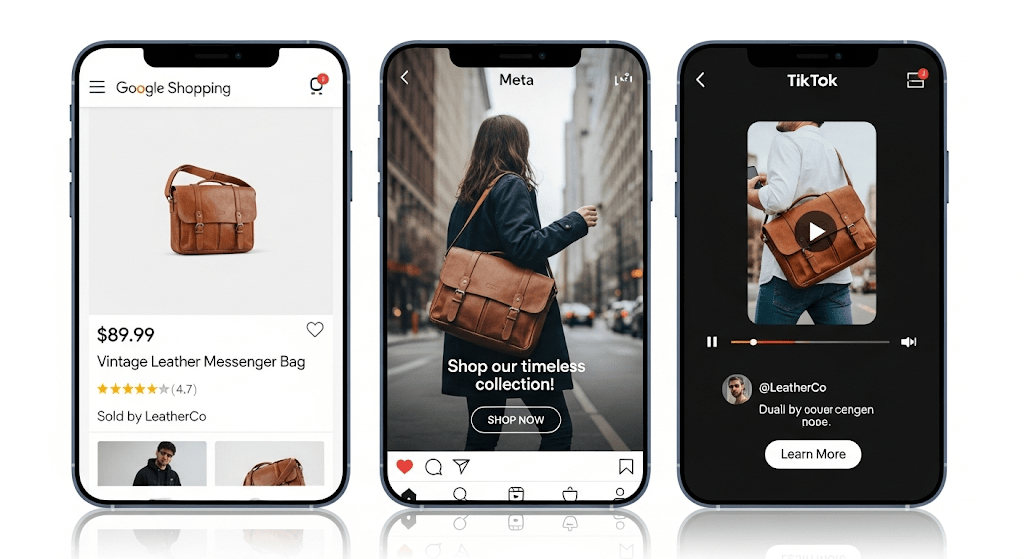
| Feature | Google Shopping | Meta Ads (Instagram/Facebook) | TikTok Ads |
|---|---|---|---|
| Best for | High-intent purchase queries | Visual discovery and retarget | Viral creative and intent-gen |
| Creative focus | Product feed + thumbnails | Strong visuals + UGC | Short-form, trend-driven vids |
| Bidding model | CPC / ROAS / Smart bidding | CPC / CPM / Value optimization | CPM / CPV with creative labs |
| Audience targeting | Keywords + shopping intent | Interest + custom audiences | Interest + creator networks |
| Typical use case | Bottom-funnel sales | Mid-funnel prospecting | Top-of-funnel growth |
4. Campaign architecture that scales
A repeatable campaign structure is non-negotiable. Use this framework:
Prospecting campaigns: broad audiences, lookalikes, and interest clusters
Mid-funnel engagement: video viewers, add-to-cart abandoners
Retargeting campaigns: dynamic retargeting by product ID
Testing campaigns: small budget for creatives and audiences
5. Creative that stops the scroll
Creative is the competitive edge. Test three creative types per SKU:
Product demo (15–30 seconds)
Social proof / testimonial (short clips)
Lifestyle hook (contextual usage)
Tips for creative testing
Run A/B tests for headline, CTA, thumbnail
Use dynamic creative to swap images and copy
Keep a creative library with performance tags
Case study: An electronics store tested demo vs lifestyle creative. Demo creatives had 46% higher CTR and 18% higher conversion rate on shopping placements when used as video thumbnails.

6. Targeting and audience segmentation
Split audiences by purchase intent and customer value. Typical segments:
New users (prospecting)
Email subscribers and past engagers
Cart abandoners (retargeting)
High-value customers (VIP lookalikes)
Advanced tip: create segments by AOV and margin, then bid separately for high-margin products to maximize profit when running ecommerce ads.
“We also help businesses set up precision retargeting inside Meta Ads campaigns so you don’t lose warm prospects.”
7. Bidding strategies and budget pacing
Use a mix of automated bidding and manual controls. Recommended sequence:
Start with data-gathering using manual CPC or Maximize Clicks
Move to value-based bidding (target ROAS) once you have conversion history
Use bid caps to control CPA spikes
Pace budgets by dayparting and seasonality
Practical example: set a week-level budget cap with higher bids during weekday peak hours when conversion rate rose 24% for a client running ecommerce ads.
8. Landing pages and conversion rate optimization
Ads drive traffic, landing pages close the sale. Align creative with landing page content. Key CRO elements:
Fast mobile-first page and clear trust signals
Clear value proposition and concise copy
Product recommendations and scarcity messaging
Simplified checkout and one-click where possible
Quick checklist: A/B test hero image, CTA text, and checkout flow to lift conversion rates for visitors arriving via ecommerce ads.
9. Tracking, attribution, and measurement
Accurate tracking is the backbone. Implement:
Server-side tracking or enhanced conversions
GA4 with ecommerce events and consistent naming
Conversion API integration for Meta and Google
UTM naming discipline and experiment tags
And yeah tracking gaps happen. When data is partial, rely on test control groups and incrementality experiments to understand the true impact of ecommerce ads.
“According to Google Ads Help enhanced conversions are now one of the most reliable ways to improve tracking accuracy.”
10. Common mistakes and how to avoid them
Ignoring product feed errors that cause disapprovals
Overcomplicating audience structure before data exists
Running many creatives without statistical significance
Chasing lowest CPC instead of ROAS and profit
Not aligning landing pages with ad creative and intent
Fix these and campaigns balance efficiency and scale.
11. Scaling and automation
Once you find winners:
Automate rules for budget scaling and creative rotation
Use value-based bidding across channels
Expand to new geographies and catalog items gradually
Automate creative refreshes every 2–4 weeks to reduce ad fatigue
12. Deep-dive sections (practical exercises and tools)
Keyword and market research exercise for ecommerce ads
Pick a top-selling SKU and map ten related queries
Label intent as buy, compare, or research
Pick matching creative and landing page for each intent
Launch small tests and iterate weekly
Inventory and lifecycle ops for ecommerce ads
Pause bids on out-of-stock SKUs automatically
Pre-warm audiences for seasonal items one to two weeks before peak demand
Flag clearance or overstock SKUs for lower-cost testing
Retargeting playbook
Use dynamic product retargeting showing exact SKU
Exclude purchasers for 30 days and reduce frequency for high-repeat items
Cross-sell complementary products to increase AOV when users return from ecommerce ads
13. Case study: how technical + creative fixes raised ROAS
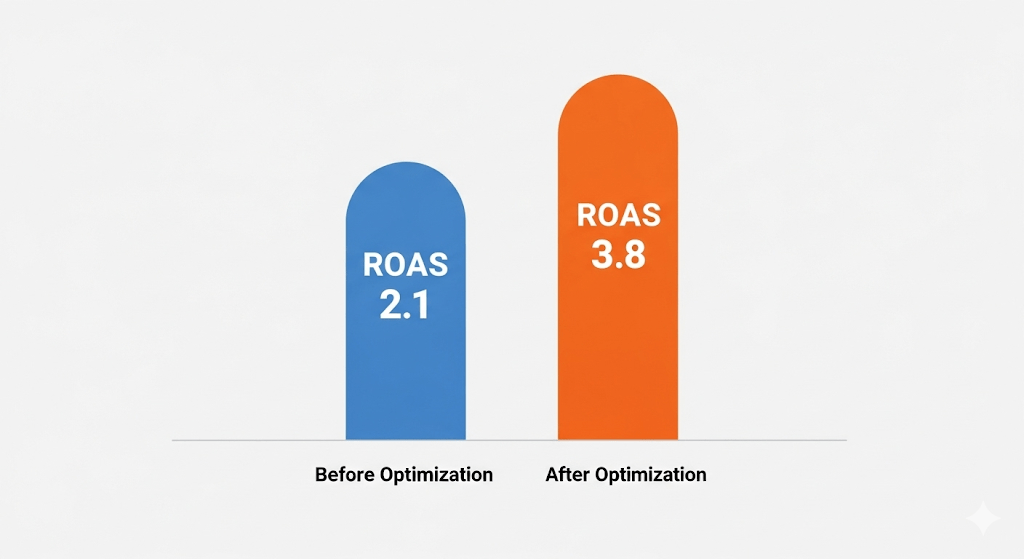
A mid-size home goods brand ran ecommerce ads across search and social with initial ROAS at 2.1. After:
Cleaning the product feed
Segmenting audiences by AOV
Swapping static images for short demos
They reached ROAS of 3.8, reduced CPA by 28%, and lifted conversion rate by 14% within ten weeks. This demonstrates how improvements in both the technical stack and creative lead to compounding gains when running ecommerce ads.
14. Pricing and service model
Samify offers managed services with transparent pricing and performance incentives. Typical models include:
Flat monthly management fee plus ad spend
Performance-based fee tied to ROAS thresholds
Hybrid model with a management fee and gainshare
15. Legal, privacy, and compliance notes
Respect user privacy, implement consent management, and follow platform policies. Use server-side events where browser signals are limited and maintain an approval checklist to prevent sudden campaign stops for policy violations.
Quick wins you can implement today
Fix product titles and images in your feed
Add dynamic retargeting tags to your site
Create three short-form creatives for top SKUs
Launch a low-budget prospecting test with lookalike audiences
Audit checkout funnel for friction points
FAQ
Q: What are ecommerce ads and which platform is best?
A: Ecommerce ads are paid campaigns to promote online products across search engines and social platforms. Platform choice depends on intent. Use Google Shopping for purchase-driven queries and Meta for discovery and retargeting.
Q: How long before I see results from ecommerce ads?
A: Expect initial signals in one to two weeks and stable performance between four and eight weeks for most campaigns. Testing and data collection are critical during that window.
Q: How much should I budget for ecommerce ads?
A: Budget depends on goals and margins. Start small to test and allocate more to campaigns with positive ROAS. Typical starting ranges are $500–$2,000 monthly for small stores.
Q: How do I measure success for ecommerce ads?
A: Track ROAS, conversion rate, AOV, and incremental revenue. Use GA4 and platform conversion APIs for accurate measurement and run incrementality tests to validate lift.
Q: Can Samify manage my ecommerce ads budget?
A: Yes. Samify manages strategy, creative testing, and bidding with transparent reports and affordable pricing. Contact us for a tailored plan.
Closing thoughts and next steps
Running ecommerce ads is an operational discipline that blends creative, data, and product management. It requires careful feed management, disciplined testing, and tight alignment between ads and landing pages. Apply these principles, and your campaigns will perform better, cost less, and scale predictably.
Samify scales ecommerce ads with data-driven playbooks. Ready to launch ecommerce ads that actually move the needle? Reach out to Samify for a free audit and a campaign blueprint tailored to your catalog and budget. We manage ecommerce ads, SEO, and Google Ads to maximize profit and growth. Contact Samify for an audit, customized campaign plan, and hands-on management that saves ad spend and improves ROAS. Get started today with a tailored quote.
 Suggested Internal Links:
 Samify